If your Milwaukee M18 charger is blinking red, it indicates an issue that needs addressing to ensure your power tools remain operational. This guide provides practical, safe, and accurate troubleshooting steps based on the product facts and common experiences.
Understanding what causes the blinking red light and how to fix it can save you time and prevent unnecessary equipment downtime. Let’s explore the most common causes and solutions.
Key Takeaways
| Understanding the blinking red light | It signals a problem with the battery, charger, or connection. |
| Check battery compatibility and condition | Ensure batteries are properly seated and not damaged. |
| Inspect the charger and connections | Look for dirt, damage, or loose plugs. |
| Follow safety procedures during troubleshooting | Always disconnect power before inspecting or handling components. |
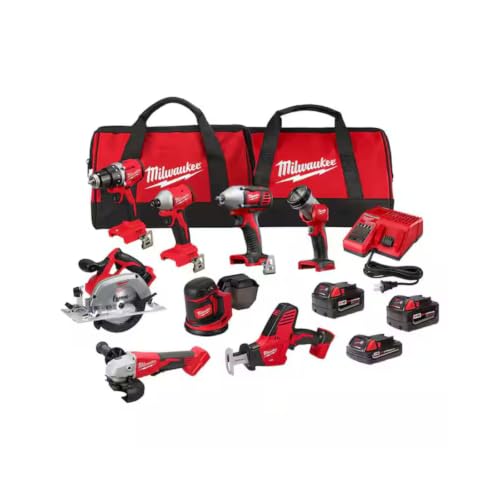
Milwaukee M18 18V Cordless Power Tool Combo Kit, 8-Tool Set, 3 Batteries, 2 Tool Bags, Charger Included
- Complete 8-Tool Set: Hammer drill, impact driver, saw, grinder, and more
- M18 Lithium-Ion Power: Consistent performance with extended runtime
- Includes 3 Batteries: Two high-capacity and one compact battery with charger
As an affiliate, we earn on qualifying purchases.
Identify the Cause of the Red Blinking Light
The first step is to understand what the blinking red light indicates. On Milwaukee chargers, a blinking red often signals a problem such as battery overheating, poor contact, incompatible batteries, or internal faults. Carefully observe the pattern of blinking—some chargers blink rapidly, others slowly, which can help diagnose the issue.
Check if the batteries are fully inserted, clean, and compatible with your charger. Since your kit includes multiple batteries, verify each one. Also, inspect for visible damage or swelling, which indicates a bad battery that needs replacement.
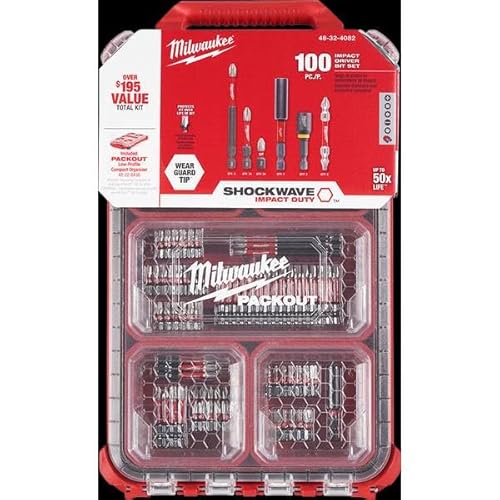
Milwaukee Shockwave 100pcs Impact Driver Bit Set Packout
As an affiliate, we earn on qualifying purchases.
Step-by-Step Troubleshooting Process
- Ensure Proper Connection: Remove the battery from the charger and inspect the metal contacts for dirt, debris, or corrosion. Clean gently with a dry cloth if needed. Re-insert the battery securely.
- Test Different Batteries: Insert each battery one at a time. If one battery causes the red blinking, it may be faulty or incompatible.
- Check for Overheating: Feel the battery and charger. If either feels hot, allow them to cool down for at least 30 minutes before retrying.
- Use Compatible Batteries: Your kit includes high-capacity and compact batteries. Confirm they are the ones designed for your charger model and are not damaged.
- Inspect the Charger: Look for visible damage or loose parts. If the charger has a reset button, try pressing it. Also, test the charger with a different power outlet.
Advanced Fixes and When to Replace
If basic troubleshooting doesn’t resolve the blinking red light, consider these advanced steps:
- Use a different power outlet or power strip to rule out electrical issues.
- Test with a known good battery from your kit, such as the Milwaukee M18 5.0 Ah XC or the 6.0Ah High Output XC, to determine if the issue is with the battery.
- If the charger continues to blink red despite all checks, it may have an internal fault. Contact Milwaukee customer service for warranty service or consider replacing the charger.
Safety Tips and Precautions
Always disconnect the charger from power before inspecting or cleaning it. Avoid using damaged or swollen batteries, as they can be hazardous. Use only Milwaukee-approved batteries and chargers to prevent damage and ensure safety.
If you notice any sparks, smoke, or unusual smells, stop using the charger immediately and seek professional assistance.
Preventative Maintenance and Best Practices
Keep the charger and batteries clean and dry. Store batteries in a cool, dry place and avoid exposing them to extreme temperatures. Regularly check for battery wear and replace old or damaged batteries promptly. Using the correct charger model and compatible batteries will extend the lifespan of your tools and chargers.
The Products in This Guide

Milwaukee M18 18V Cordless Power Tool Combo Kit
- ✔ Battery Type: Lithium-ion
- ✔ Maximum Battery Capacity: 6.0Ah
- ✔ Tool Compatibility: Over 200 M18 tools

Milwaukee Shockwave 100pcs Impact Driver Bit Set Packout
- ✔ Impact Rating: Impact-rated steel
- ✔ Number of Pieces: 100
- ✔ Storage: Packout case
Milwaukee M18 18V Cordless Power Tool Combo Kit
The Milwaukee M18 18V Cordless Power Tool Combo Kit is a comprehensive set designed for professionals and serious DIYers. It includes a variety of tools, three batteries, and a charger, making it versatile and ready for a range of applications. Proper care and troubleshooting can keep your charger functioning optimally.
Pros:
- Includes 8 tools for versatile tasks
- 3 batteries for extended runtime
- Durable construction
- Comprehensive kit for professionals
Cons:
- Charger blinking red may indicate faults
- Battery maintenance required
- Weight of the kit can be heavy for prolonged use
Best for: Heavy-duty construction, remodeling, and maintenance work
Not ideal for: Light DIY tasks or occasional use without proper maintenance
Bottom line: A complete and versatile cordless toolkit, with troubleshooting tips to maximize your equipment’s lifespan.
Milwaukee Shockwave 100pcs Impact Driver Bit Set Packout
Pair your Milwaukee tools with this Shockwave Impact Driver Bit Set for maximum efficiency. It includes 100 impact-rated bits stored in a durable Packout case, perfect for professional use or serious DIY projects.
Pros:
- Wide variety of bits
- Impact-rated for durability
- Organized storage case
- Compatible with Milwaukee impact drivers
Cons:
- Set may be overkill for casual users
- Bits can wear out with heavy use
- Case size may be bulky for some
Best for: Heavy-duty impact driving and fastening
Not ideal for: Light DIY or occasional home repairs
Bottom line: A comprehensive set to enhance your impact driving performance and storage convenience.
Frequently Asked Questions
What does the blinking red light on my Milwaukee charger mean?
It typically indicates a problem such as overheating, poor contact, incompatible batteries, or internal faults. Check the pattern of blinking for clues.
How do I fix a blinking red light on my Milwaukee charger?
Ensure proper connection of the battery, clean contacts, test with different batteries, allow components to cool down, and verify compatibility. If problems persist, contact Milwaukee support.
Can I use any Milwaukee battery with my charger?
Only batteries designed for your specific charger model and system, such as the M18 lithium-ion batteries, are recommended to ensure compatibility and safety.
What should I do if my battery gets hot during charging?
Disconnect and let it cool in a safe area. Avoid using damaged or swollen batteries, and replace if necessary. Overheating can indicate a faulty battery.
When should I replace my Milwaukee charger?
If troubleshooting does not resolve the blinking red light, and the charger shows signs of damage or fails to charge batteries properly, consider replacing it or contacting support.
Maintaining Your Milwaukee Power Tools for Peak Performance
Regularly inspecting and maintaining your Milwaukee batteries and charger can prevent issues like blinking red lights. Always use compatible batteries, keep contacts clean, and store equipment properly. When problems arise, following the step-by-step troubleshooting guide can save you time and money. Staying proactive ensures your tools remain reliable for demanding tasks, whether on the jobsite or at home.
Affiliate disclosure: As an Amazon Associate we earn from qualifying purchases. Prices and availability are accurate as of the time of publishing.